Skip to content
Features

What CoSell does

Your co-sell deals reach AWS Partner Central checked first, and AWS's answers, referrals and leads come back. Everything here is in the product today.

Last updated

Deals become ACE opportunities

A deal that reaches your gate stage in the CRM is created in Partner Central, checked first, with your solutions attached and submitted for AWS review.

  • You choose which deals are co-sell deals: a filter on CRM fields, or a Co-sell with AWS checkbox a seller ticks
  • You choose the gate stage. Deals below it are tracked and nothing is sent
  • Each deal is checked against AWS's rules before anything is sent: customer, website, industry, country, a future close date, monthly spend, and delivery model, sales activities and use case from AWS's own lists
4 more details
  • A deal that fails the check shows needs information with the list of what to fix, and nothing reaches AWS
  • CoSell asks for a customer business problem of at least 50 characters, so it says something useful; AWS's own minimum is 20
  • Your solutions are attached and the opportunity is submitted for AWS review
  • The ACE opportunity ID, the Partner Central link and the review status are written back to the deal
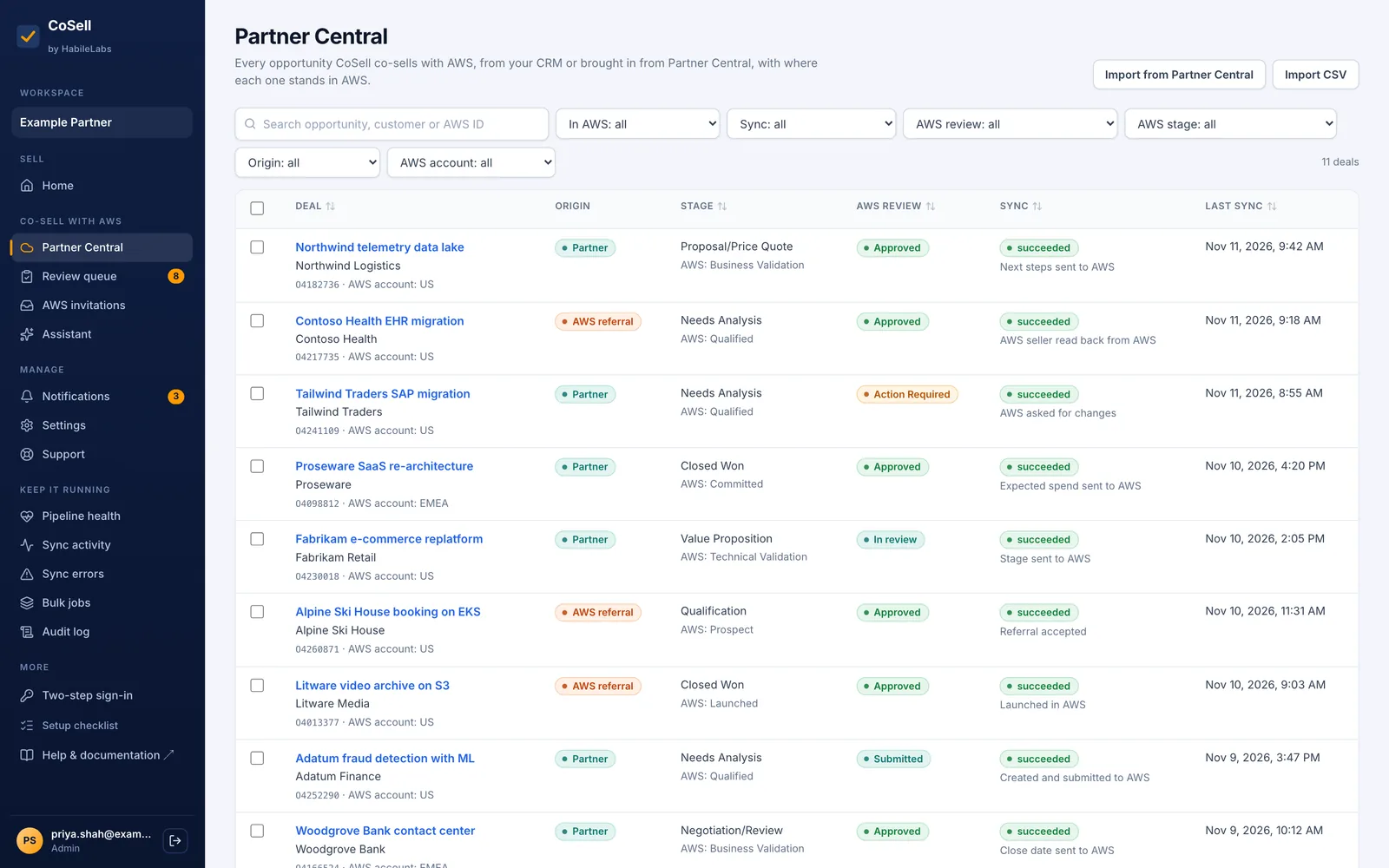
CoSell's Partner Central list: each deal with its origin (partner or AWS referral), CRM and AWS stage, AWS review status such as Approved or Action Required, and the last sync
Opportunities in Partner Central. Shown with illustrative data.

Both directions, kept in step

Later edits go to AWS wherever AWS still accepts them, and what changes in Partner Central comes back to the deal.

  • Stage, close date, expected spend and next steps go to AWS as they change in the CRM
  • AWS's review status, its comments, the AWS seller and AWS's stage come back to the deal
  • Changes made in Partner Central arrive within seconds through events
3 more details
  • A reconciliation every 15 minutes catches anything an event missed
  • Fields AWS locks after approval or launch are left alone, and the deal says so instead of failing
  • Only real changes are sent: CoSell compares with what it sent last
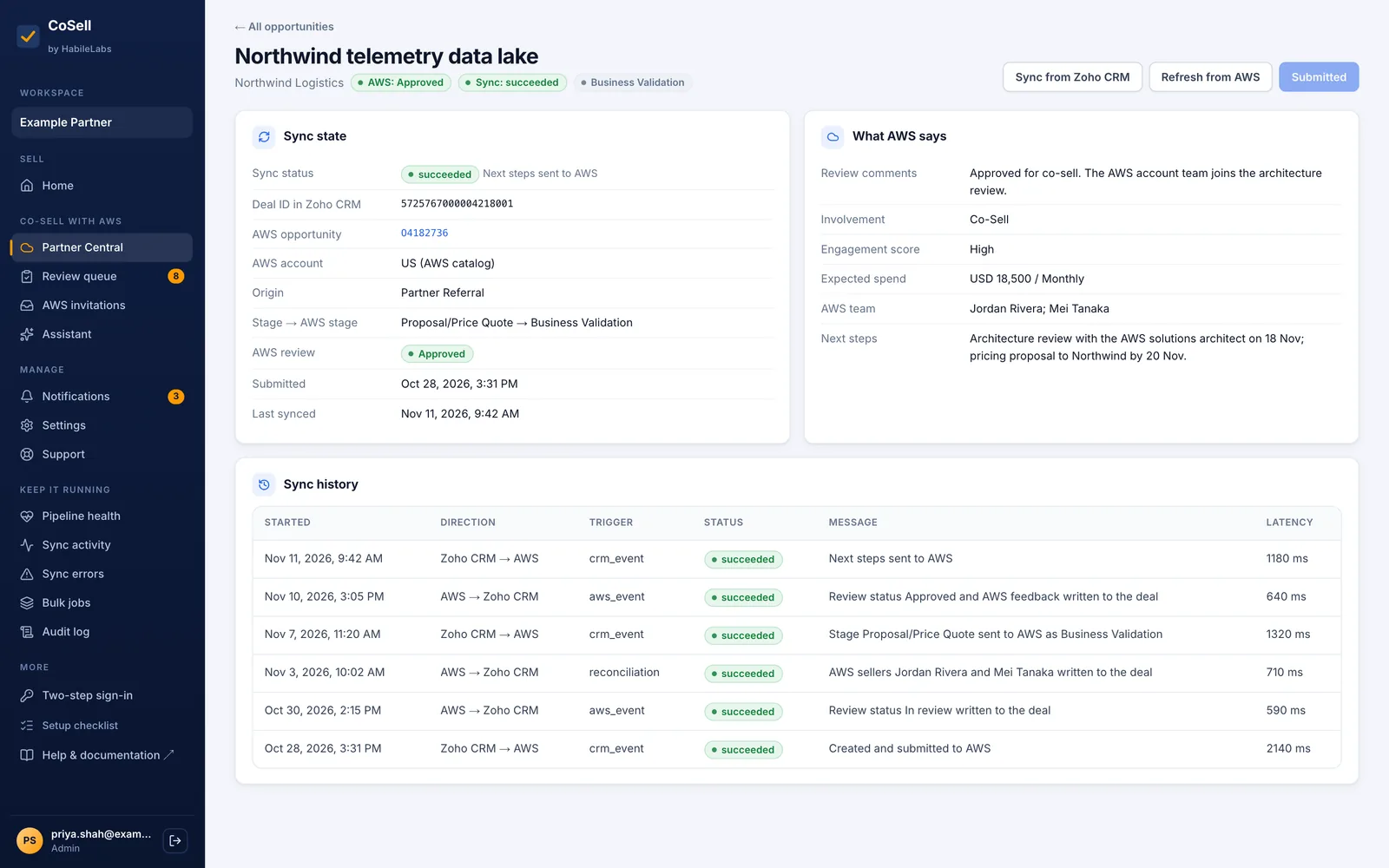
An opportunity in CoSell: ACE ID, AWS review status, AWS team, expected spend, next steps, stage mapping and every update between the CRM and Partner Central
One opportunity. Shown with illustrative data.

AWS referrals and leads

Invitations from AWS arrive with their deadline and an owner. Accepting a referral creates the account, contact and deal in your CRM.

  • Referrals and leads arrive within seconds, with a notification in the console and by email
  • Each shows a respond-by time (your own SLA) and when AWS expires it, with a reminder once the SLA passes
  • Accept in CoSell and it is accepted in Partner Central; the account, contact and deal follow in your CRM, marked as an AWS referral
3 more details
  • Reject with a reason AWS accepts, such as outside your territory
  • AWS leads arrive as CRM leads you can work and convert
  • A retry never creates a second deal
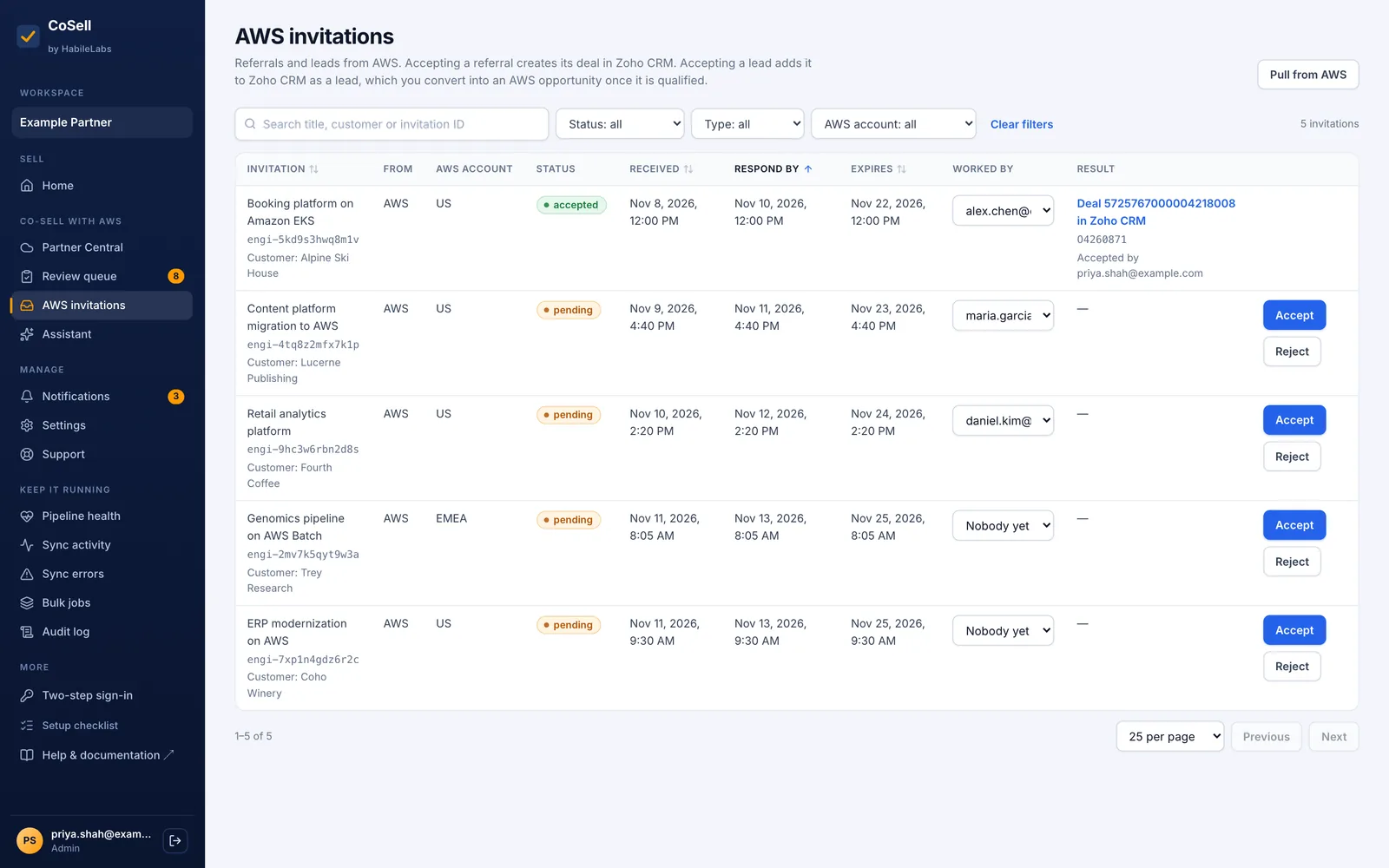
AWS invitations in CoSell: referrals with respond-by and expiry dates and an owner, with Accept and Reject
AWS referrals. Shown with illustrative data.

A review queue before AWS sees anything

Choose which deals go to AWS, see what AWS would say, fill in what is missing in one form and approve them one by one or together.

  • Deals headed for AWS that are not in Partner Central yet, with what each one still needs
  • One form for everything AWS requires, so nobody switches between the CRM and Partner Central
  • Approve one deal or many; CoSell creates and submits each opportunity
2 more details
  • Run fully automatic from the gate stage, or route every new deal through review
  • Older deals: find the ones that match your filter and bring them into the queue
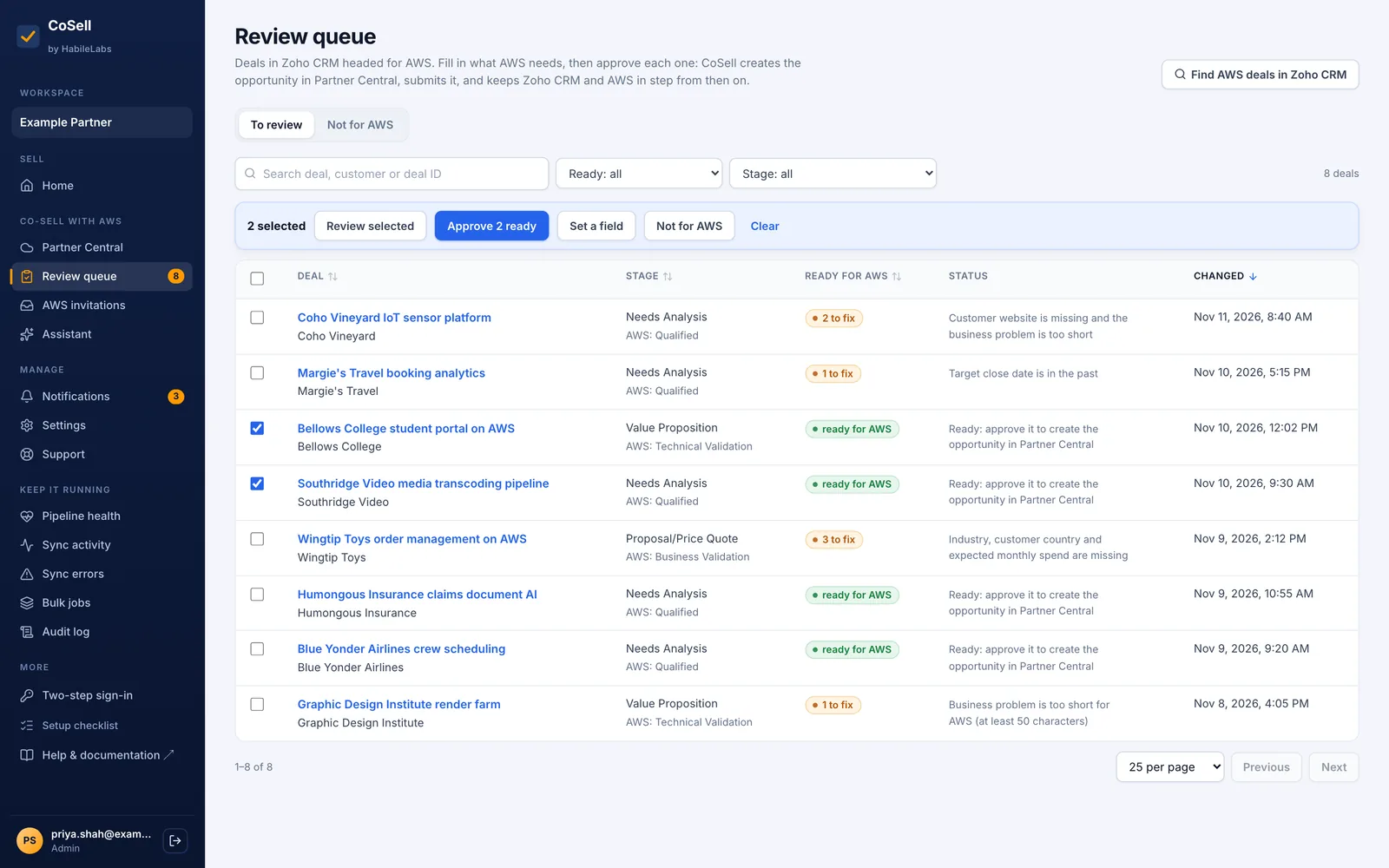
CoSell's review queue: CRM deals headed for AWS with what each still needs, and approval in bulk
Review queue. Shown with illustrative data.

A sales dashboard and roles

Home shows open pipeline, deals won this quarter, win rate, pipeline by stage and what needs attention. Sales reps see their own deals.

  • Open pipeline, won this quarter, win rate and pipeline by stage
  • AWS referrals to answer and deals waiting for review, on the home page
  • Sales rep and sales manager roles; reps work their own deals, managers their team's
2 more details
  • Alliance managers manage members and the AWS settings
  • Invite-only accounts; every member's actions are in the audit log
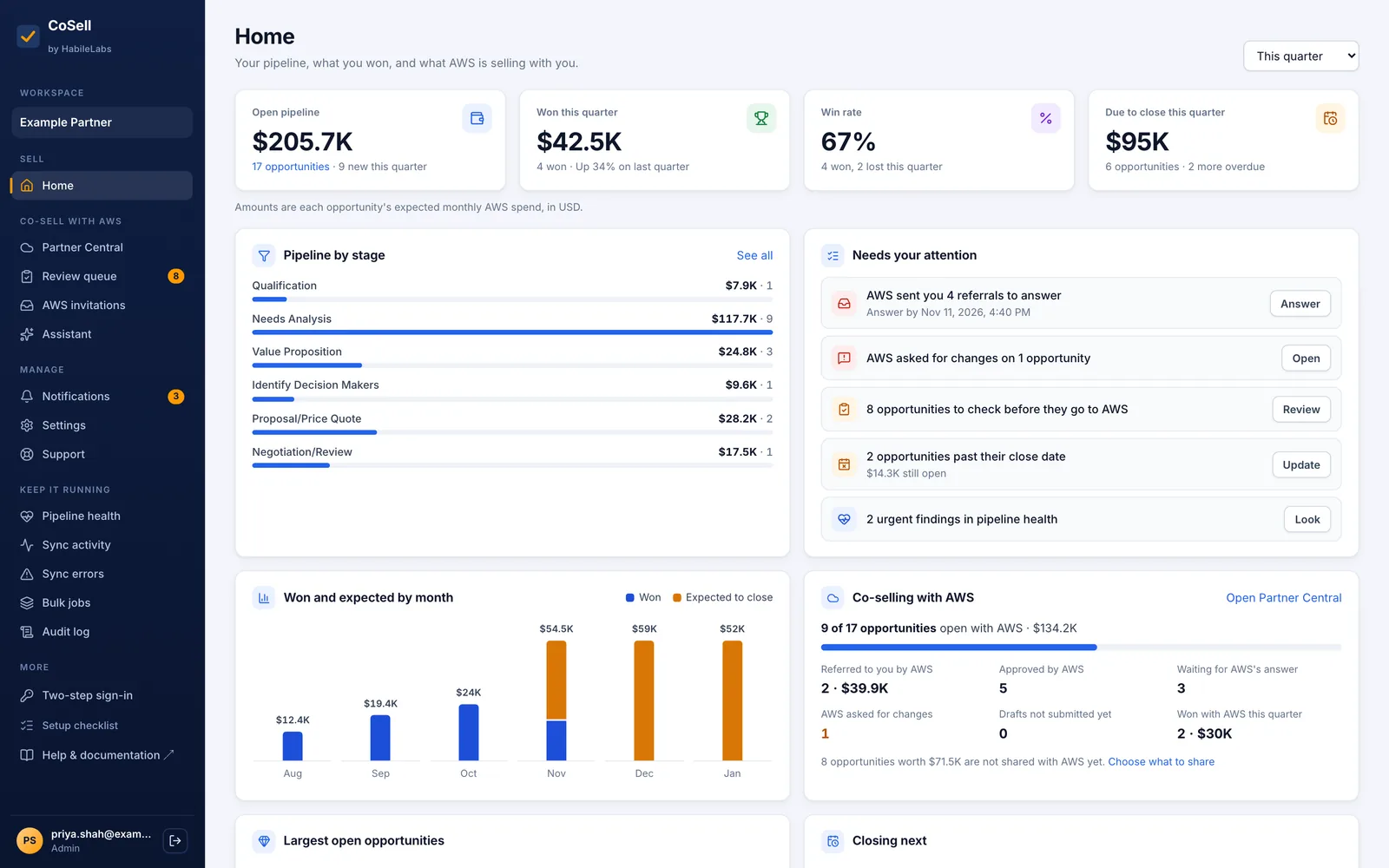
CoSell home dashboard: open pipeline, deals won this quarter, win rate, pipeline by stage, AWS referrals to answer and deals waiting for review
Sales dashboard. Shown with illustrative data.

Several Partner Central accounts

Link more than one AWS account to one workspace, and let routing rules decide where each new deal is created.

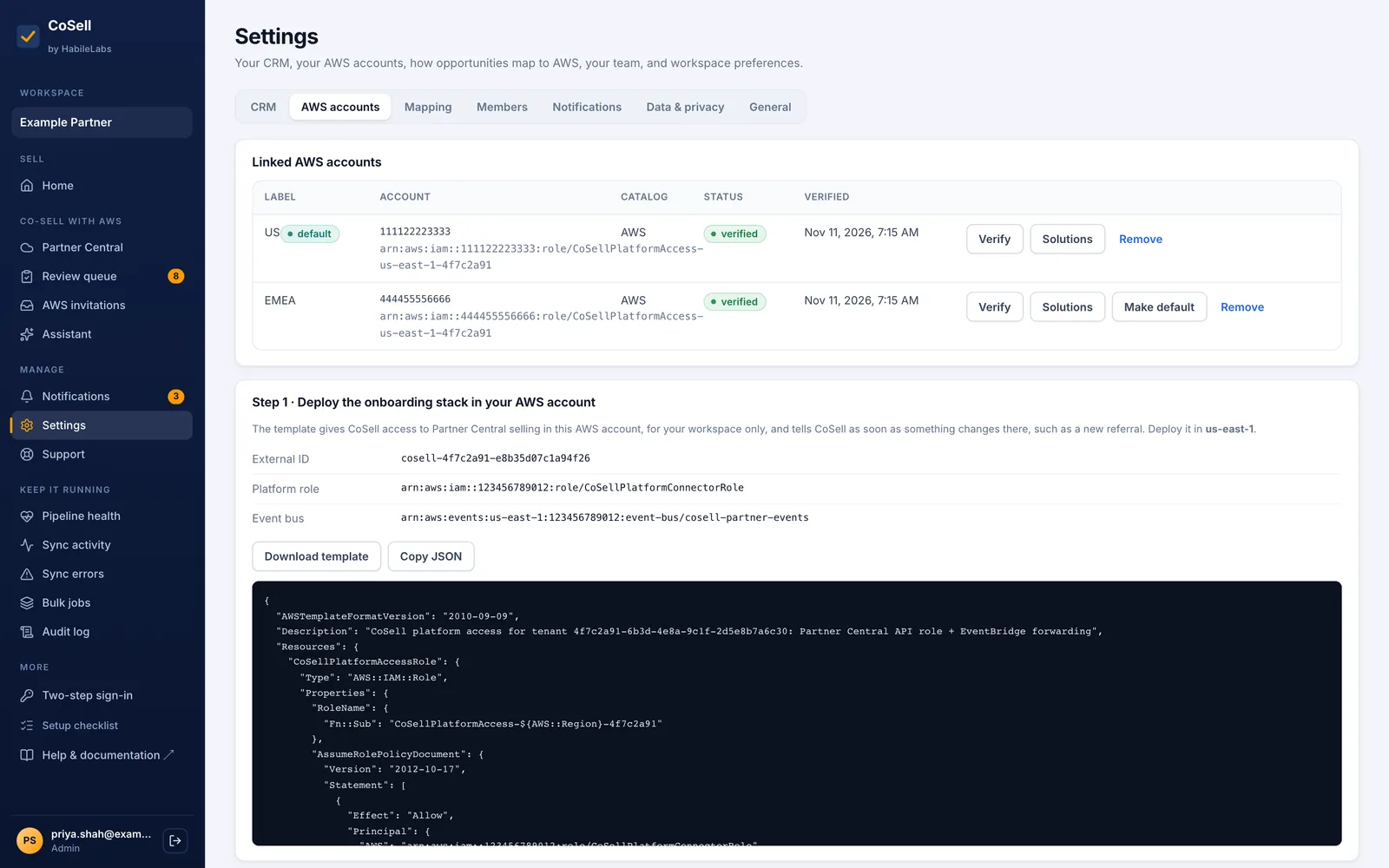
  • Each account linked through an IAM role you create with one CloudFormation stack
  • Routing rules: the first rule that matches picks the account; the rest go to the default
  • A rule can give one product line its own Partner Central solutions
1 more detail
  • 1, 3 or 10 accounts by plan
Two AWS Partner Central accounts linked to one CoSell workspace through an IAM role with an external ID
Linked AWS accounts. Shown with illustrative data.

Help that waits for a person

A quality coach for the customer business problem, drafts of next steps, an assistant and AWS's own Partner Central agent. Nothing changes a deal until a person approves it.

  • Quality coach: suggests a rewrite of the customer business problem before it goes to AWS
  • Drafting: next steps and a summary from the deal and pasted meeting notes
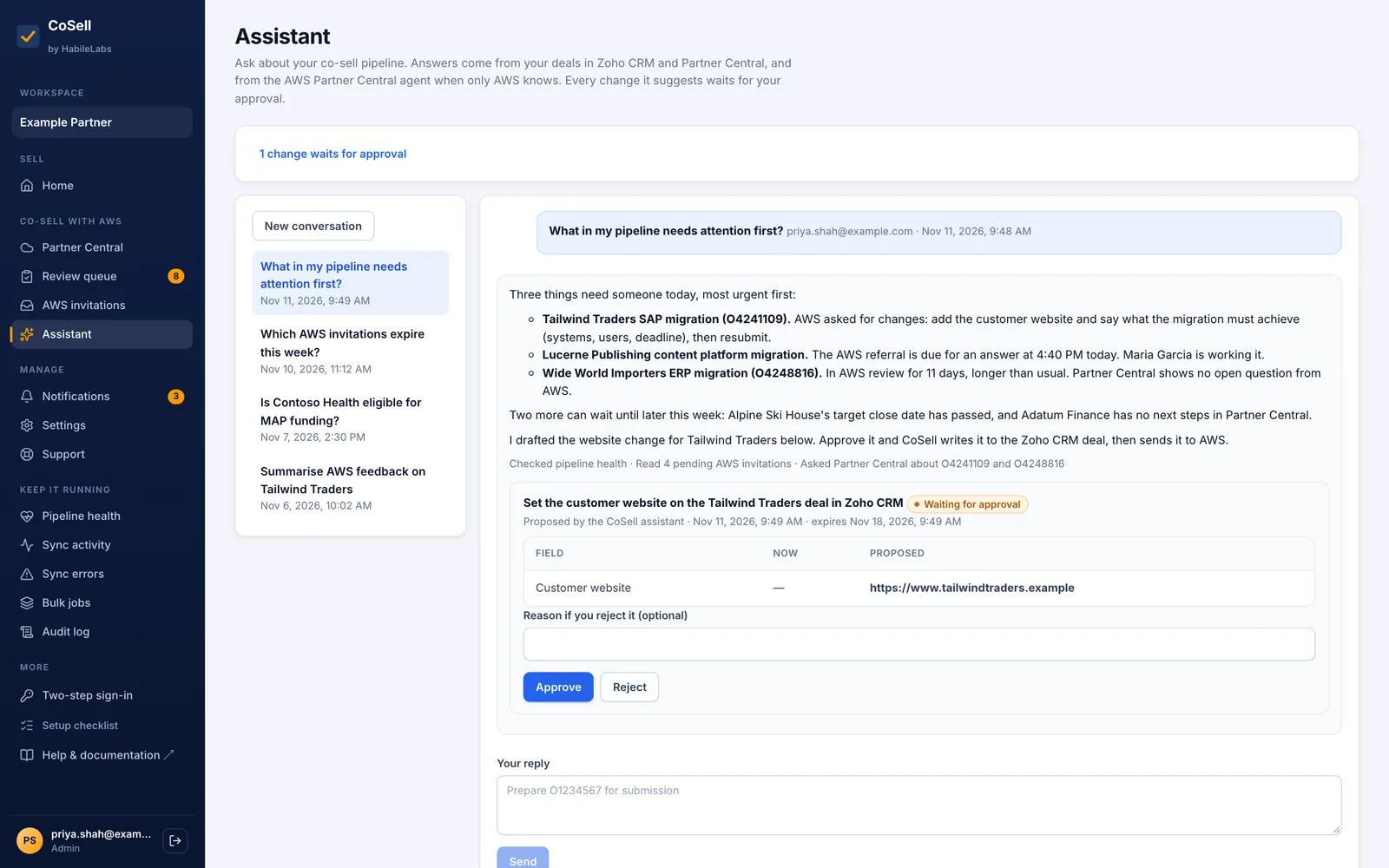
  • Ask Partner Central: questions to AWS's Partner Central agent from the opportunity page; a change it proposes waits for approval
2 more details
  • The assistant reads only your workspace; every change it suggests waits for approval
  • An admin can turn every AI feature off; the checks and pipeline health keep working
CoSell's assistant answering what needs attention across CRM deals, AWS referrals and Partner Central, with a proposed change waiting for approval
Assistant. Shown with illustrative data.
Also in CoSell

Quiet work that keeps co-selling running

Nothing waits unseen

Pipeline health lists every deal and invitation that needs a person, most urgent first, with the evidence and the fix.

  • AWS asked for changes (Action Required), missing information, a failed sync, a referral about to expire
  • Worked out from CoSell's own records, so the page costs no CRM or AWS calls
  • One error per deal in the error inbox, with retry; errors that resolve themselves close by themselves
2 more details
  • Sync history for every deal: each update between the CRM and Partner Central
  • Notifications in the console and by email; an audit log of every action

Bring in what is already in Partner Central

Import opportunities that exist only in Partner Central into your CRM: the live ones, every open one, or the last 12 months.

  • Pick opportunities one by one, or import all of them in the background as bulk jobs you can follow and cancel
  • Open opportunities become open deals; won and lost ones become closed deals with AWS's reason for the loss
  • In a CRM of your own, the import stops at 60% of the day's CRM calls and carries on the next day, so sync never starves
2 more details
  • On CoSell CRM, the first linked production account's pipeline and invitations are imported once, by themselves
  • An import sends nothing back to AWS

Bulk work, partners and private offers

Import deals from a CSV, change or reassign many at once, invite other AWS partners to an opportunity and draft private offers.

  • Bulk operations: CSV import, stage and field changes, reassignment, now or at a time you choose
  • Partners on an opportunity: invite other AWS partners and see who is in the engagement
  • Private offers: link AWS Marketplace private offers to an opportunity and draft a new one
1 more detail
  • Data export of everything the workspace holds, without credentials
Know before you buy

Where CoSell stops

The same notes are in the documentation. We would rather you read them here first.

  • The AWS Marketplace offer is for AWS accounts in India, for now

    HabileLabs sells on AWS Marketplace from India, and its offers are limited to AWS accounts in India today. Outside India, write to us: we will tell you when it opens to your country.

  • One CRM per workspace

    A workspace connects one of Salesforce, HubSpot, Dynamics 365, Zoho CRM or LeadSquared, or runs on CoSell CRM. CoSell CRM can stay beside the CRM you connect, and you choose which one AWS's referrals and leads land in. Two external CRMs in one workspace are not supported.

  • Partner Central is served from us-east-1

    The Partner Central API is only in US East (N. Virginia), so a hosted workspace's data is kept there, and an install in your own AWS account goes in us-east-1, in the account linked to your Partner Central.

  • AWS decides what can still change

    After AWS approves or launches an opportunity it locks some fields. CoSell does not try to change them; the deal says which update AWS no longer accepts. Partner Central's own rules and outages apply to every tool that uses its API.

  • LeadSquared's first connection is made with us

    The LeadSquared connector follows LeadSquared's API documentation but has not yet run against a live account. HabileLabs support makes the first connection with you and confirms what that documentation leaves open.

  • No SOC 2 report yet

    CoSell passed AWS's Foundational Technical Review on 14 November 2026 (AWS Qualified Software). It holds no SOC 2 or ISO 27001 certificate; a SOC 2 Type II audit is planned and has not started.

How the alternatives compare

Available in AWS Marketplace

Try CoSell free for 30 days

Start the free trial on AWS Marketplace with your AWS account. Your workspace is ready in minutes, and you connect your CRM yourself.