
Hosted by HabileLabs, or in your own AWS account
The same software runs two ways, on the same plans and prices. Hosted is the quickest start; in your own AWS account, one CloudFormation stack keeps your pipeline in the account linked to your Partner Central.
Last updated
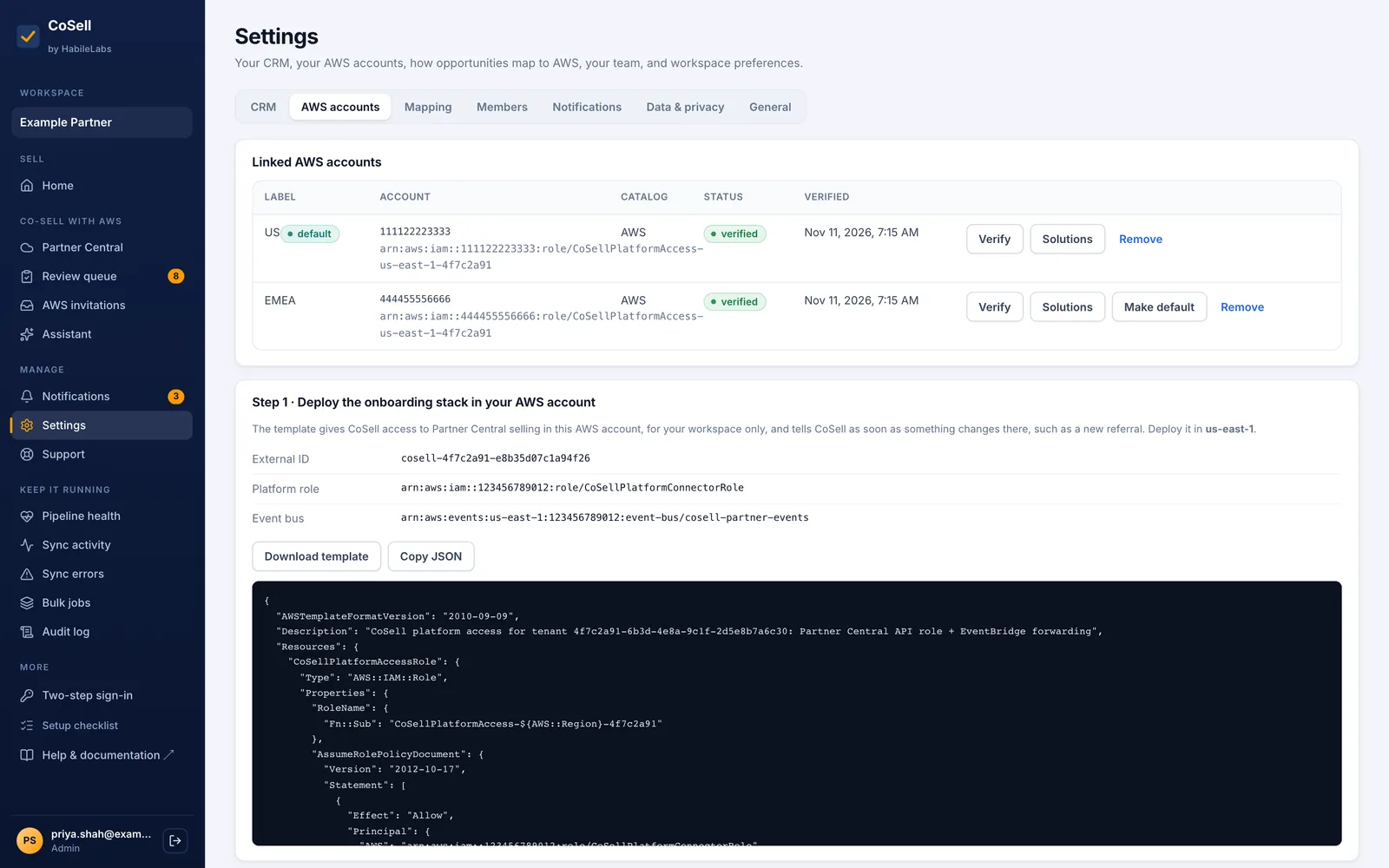
Choose where CoSell runs
You choose when you set up your account on the HabileLabs Marketplace, after subscribing on AWS Marketplace.
Hosted by HabileLabs
Nothing to run. Sign in and connect
CoSell runs in HabileLabs' AWS account in us-east-1. It reaches your Partner Central through an IAM role you create in your own account with one CloudFormation stack, and your workspace is isolated from every other.
- One CloudFormation stack in your account creates the access role; no AWS keys are shared
- The role trusts only CoSell, and only with your workspace's external ID
- Upgrades are automatic
- Delete the stack to revoke CoSell's access at once
- Where your data lives
- Your workspace's records in HabileLabs' AWS account in us-east-1, isolated per workspace. Deals stay in your CRM and opportunities in your Partner Central.
- What you deploy
- An IAM role, from a launch link, in a few minutes
- Upgrades
- Automatic
- What AWS bills you
- The CoSell subscription only
- Fits
- Most partners: the quickest start, nothing to operate
In your own AWS account
The same software, in the account linked to your Partner Central
One CloudFormation stack in your AWS account, in us-east-1, runs the same software for one workspace. It calls Partner Central with its own role, and your deals stay in your account. HabileLabs cannot see into it.
- Launch from the listing's Quick Launch or the HabileLabs Marketplace portal; the stack takes 15 to 20 minutes
- AWS serverless only: no VPC, no servers to patch, no CDK bootstrap
- A production slot for your live pipeline and a non-production slot that works with the Partner Central Sandbox
- It checks in with HabileLabs once a day for licensing, sending counts only
- You choose when to update; each release upgrades from the two before it
- Where your data lives
- In your AWS account. Only a daily licence check-in with counts goes to HabileLabs.
- What you deploy
- The CoSell stack, in about 20 minutes
- Upgrades
- You update the stack when a new version is out
- What AWS bills you
- The subscription, plus the stack's AWS resources: about USD 11.50 to 14 a month at list prices
- Fits
- Partners whose pipeline must not leave their own AWS account
The same in both
- The same features, plans and prices
- Every CRM CoSell connects: Salesforce, HubSpot, Dynamics 365, Zoho CRM, LeadSquared or CoSell CRM
- Two-step sign-in for admins, passkeys for anyone, and an audit log of every action
- Support from HabileLabs, with a first-response target by plan
Between your CRM and Partner Central
CoSell uses AWS serverless services only, in us-east-1, where the Partner Central API is served.
Your CRM
CoSell: hosted, or in your AWS account
AWS Partner Central
What CoSell can do in your AWS account
- Partner Central Selling actions and read access to Partner Central, nothing else
- Assumed for up to 15 minutes at a time; no long-lived keys exist
- The trust policy names CoSell's platform role and your workspace's external ID, which blocks the confused-deputy problem
- Partner Central events reach CoSell through an EventBridge rule the same stack creates
Before you install in your own account
- The AWS account linked to your Partner Central, in us-east-1
- Permission to create the stack: the IAM policy published beside the template on AWS Marketplace is enough
- Amazon Nova 2 Lite enabled in Amazon Bedrock in us-east-1, for the AI features
- Your licence key (it starts with COS-), shown by the HabileLabs Marketplace portal
- Optional: your own hostname with an ACM certificate, and a sender address verified in Amazon SES
What AWS bills you each month
On top of the subscription, AWS bills your account for what the stack uses. List prices in US East (N. Virginia), before any free tier, from CoSell's own daily cost rollups.
| Deals tracked | What the stack keeps running | CoSell's work | A month |
|---|---|---|---|
| 50 | USD 11.30 | USD 0.26 | about USD 11.50 |
| 250 | USD 11.30 | USD 0.57 | about USD 12.00 |
| 1,000 | USD 11.30 | USD 1.73 | about USD 13.00 |
Most of it is fixed: alarms, a dashboard, custom metrics, a KMS key, two secrets and Cognito's threat protection for ten people. An account that does not already use AWS's always-free allowances pays as little as about USD 4.30 a month for the fixed part.
The first year in your own account
AWS Partners that run their co-selling through CoSell can have the first year in their own AWS account free, as a private offer on AWS Marketplace. Email support@habilelabs.io with the ID of the AWS account linked to your Partner Central.
From subscribing to your first synced deal
Subscribe on AWS Marketplace
Choose a plan and a 1- or 12-month contract, then Set up your account.
Choose how to run it
On the HabileLabs Marketplace sign-up, enter your company and a work email, and choose Hosted by HabileLabs or In my AWS account.
Connect AWS
Hosted: launch the access-role stack and paste its role ARN. Your own account: launch the CoSell stack with your licence key.
Connect your CRM and map stages
Connect Salesforce, HubSpot, Dynamics 365, Zoho CRM or LeadSquared, or use CoSell CRM; choose the gate stage and which deals go to AWS, and follow the onboarding checklist.
About where CoSell runs
Hosted or in my own AWS account: what is the difference?
Does CoSell need AWS access keys?
Why does an install in my own account have to be in us-east-1?
Where is my data kept?
Available in AWS Marketplace
Try CoSell free for 30 days
Start the free trial on AWS Marketplace with your AWS account. Your workspace is ready in minutes, and you connect your CRM yourself.